DOS didn’t have sudo yet. This gross oversight has been addressed.
SUDO examines the environment for the COMSPEC variable to find the default command interpreter, falling back to C:\COMMAND.COM if not set. The interpreter is then executed in unprotected real mode for full privileges.
Some camera-equipped Apple devices have dedicated camera indicator lights. E.g. recent MacBook Pros and MacBook Airs have them in the notch, next to the camera itself. The Studio Display has one in the bezel, next to its camera. Other devices — like iPhones and, now, the MacBook Neo — render a green indicator dot on the device’s display. One might presume that the dedicated indicator lights are significantly more secure than the rendered-on-display indicators. I myself made this presumption in the initial version of my MacBook Neo review last week. This presumption is, I believe, wrong.
MacBook Neo combines system software and dedicated silicon
elements within A18 Pro to provide additional security for the
camera feed. The architecture is designed to prevent any untrusted
software — even with root or kernel privileges in macOS — from
engaging the camera without also visibly lighting the on-screen
camera indicator light.
The reason it’s tempting to think that a dedicated camera indicator light is more secure than an on-display indicator is the fact that hardware is generally more secure than software, because it’s harder to tamper with. With hardware, a dedicated hardware indicator light can be connected to the camera hardware such that if the camera is accessed, the light must turn on, with no way for software running on the device, no matter its privileges, to change that. With an indicator light that is rendered on the display, it’s not foolish to worry that malicious software, with sufficient privileges, could draw over the pixels on the display where the camera indicator is rendered, disguising that the camera is in use.
If this were implemented simplistically, that concern would be completely valid. But Apple’s implementation of this is far from simplistic. Friend of the site and renowned developer and low-level-OS spelunker Guilherme Rambo texted me a note, which, with his permission, I’ll quote:
Tidbit: the software-based camera indicator light in the MacBook
Neo runs in the secure exclave¹ part of the chip, so it is almost
as secure as the hardware indicator light. What that means in
practice is that even a kernel-level exploit would not be able to
turn on the camera without the light appearing on screen. It runs
in a privileged environment separate from the kernel and blits the
light directly onto the screen hardware. All of that applies to
the mic indicator as well, which is a bonus compared to the
camera-only hardware indicator.
¹ Exclaves run on a completely isolated realtime operating system
that communicates with the kernel and userspace using a very
limited API surface. Not to be confused with Secure Enclave,
that’s a different thing.
(That’s right, his text message had a footnote. Like I said, he’s a friend of the site. Also: blitting.)
Exclave was the word I needed. Once I read that, it came back to me, and I recalled Random Augustine’s “On Apple Exclaves”, which I linked to almost exactly one year ago and described as “a splendidly nerdy but very approachable overview of the evolution of Apple’s XNU kernel over the last decade”. As Augustine documents, secure exclaves are something Apple had been building toward for a decade, but which only became enabled with the M4 and A18 generations of Apple Silicon.
If you’re curious, I encourage you to read (or re-read) Augustine’s “On Apple Exclaves”, which should disabuse you of any concerns that these on-display camera indicators on the MacBook Neo and recent iPhone models are anything less than very secure designs.
One thing some people hate about voice control is that you need to have a process always running, listening for the wake word. If your system isn’t totally locally-hosted, that can raise some privacy eyebrows. Perhaps that’s part of what inspired [SpannerSpencer] to create this 24th century solution: a Comm Badge straight out of Star Trek: The Next Generationhe uses to control his smart home.
This hack is as slick as it is simple. The shiny comm badge is actually metal, purchased from an online vendor that surely pays all appropriate license fees to Paramount. It was designed for magnetic mounting, and you know what else has a magnet to stick it to things? The M5StickC PLUS2, a handy ESP32 dev kit. Since the M5Stick is worn under the shirt, its magnet attached to the comm badge, some features (like the touchscreen) are unused, but that’s okay. You use what you have, and we can’t argue with how easy the hardware side of this hack comes together.
[Spanner] reports that taps to the comm badge are easily detected by the onboard accelerometer, and that the M5Stick’s microphone has no trouble picking up his voice. If the voice recordings are slightly muffled by his shirt, the Groq transcription API being used doesn’t seem to notice. From Groq, those transcriptions are sent to [Spanner]’s Home Assistant as natural language commands. Code for the com-badge portion is available via GitHub; presumably if you’re the kind of person who wants this, you either have HA set up or can figure out how.
It seems worth pointing out that the computer in Star Trek: TNG did have a wake word: “computer”. On the other hand it seemed the badges were used to interface with it just as much as the wake word on screen, so this use case is still show accurate. You can watch it in the demo video below, but alas, at no point does his Home Assistant talk back. We can only hope he’s trained a text-to-speech model to sound like Majel Barrett-Roddenberry. At least it gives the proper “beep” when receiving a command.
This would pair very nicely with the LCARS dashboard we featured in January.
The USB-C port has become a defacto connectivity standard for modern devices, largely supplanting the ugly mess of barrel jacks and micro USB connectors that once cursed us. While their reliability is good, they don’t last forever, and can be a pain to replace in most devices if they do fail. However, a new part from JAE Electronics could change that.
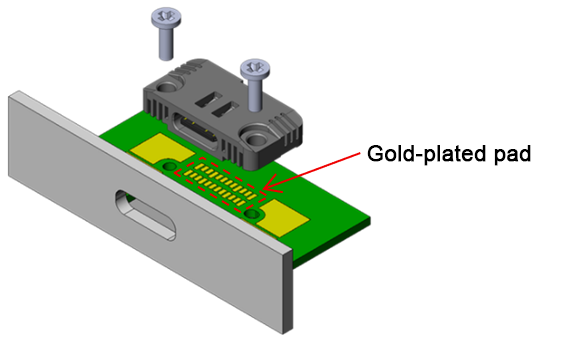
The problem with replacing USB connectors in most hardware is that they’re soldered in place. To swap them out, you have to master both desoldering and soldering leads of a rather fine pitch. It’s all rather messy. In the interest of satisfying the EU’s new Ecodesign for Sustainable Products Regulation (ESPR), JAE Electronics has developed a USB-C connector that’s easier to replace. Rather than being soldered in, the part is simply clamped down on to a printed circuit board with small screws. As the part is torqued down, small gold-plated contacts are compressed into pads on the PCB to make the necessary contact.
The connector is fully compatible with USB 4 version 2.0. (Don’t ask us how they number these things anymore.) It comes in single and dual connector versions, and is capable of USB PD EPR at up to 240 W (5A/48V). The part does have some drawbacks—namely, the footprint of the metal-shelled part is somewhat larger than most soldered USB C connectors. Whether this precludes its use is very much an application-specific matter for product engineers to decide.
In any case, if you find yourself designing hardware with heavily-used USB C ports, you might find this part useful. It’s not widely available yet, but some parts should be landing at Mouser in coming months. We’ve explored some of the ways USB-C connectors can be fouled and damaged before, too. Sound off with your opinions on this new part in the comments.
Liquid nitrogen isn’t exactly an everyday material, but it’s acquired conveniently enough to be used in extreme overclocking experiments, classroom demonstrations, chemistry and physics experiments, and a number of other niche applications. Liquid oxygen, by contrast, is dangerous enough that it’s only really used in rocket engines. Nevertheless, [Electron Impressions] made some of his own, and beyond the obvious pyrotechnic experimentation, demonstrated its unusual magnetic properties. Check out the video, below.
The oxygen in this case was produced by electrolysis through a proton-exchange membrane, which vented the hydrogen into the atmosphere and routed the oxygen into a Dewar flask mounted at the cold end of a Stirling cryo-cooler. The cooler had enough power to produce about 30 to 40 milliliters of liquid oxygen per hour, enough to build up an appreciable amount in short order. As expected, the pale blue liquid caused burning paper to disappear in a violent flame, and a piece of paper soaked in it almost exploded when ignited.
More interestingly, a piece of oxygen-soaked paper could also be picked up with a strong enough magnet. This is due to molecular oxygen’s paramagnetism, which is too weak to be significant in a gas made of quickly-moving molecules, but becomes noticeable in a liquid. When some liquid oxygen was poured onto a strong magnet, it stuck to the edges of the magnet, whereas liquid nitrogen just splashed away. Even as the liquid oxygen evaporated, it was possible to faintly see some of the cold vapours sticking close to the magnet. [Electron Impressions] tried to create a kind of coil gun by wrapping a coil around a test tube containing liquid oxygen, but it didn’t really work. Any effect was imperceptible among the disturbances caused by boiling oxygen and the physical jolt of the power supply connecting.
It’s not a process we’ve seen before, but the boiling point of liquid nitrogen is lower than the boiling point of oxygen, so if you have a convenient source of liquid nitrogen, it’s simple enough to make liquid oxygen.
In a summer program at MSU's cyclotron for middle schoolers over 35 years ago they would put liquid nitrogen on a large magnet, causing oxygen in the air to liquefy and stick to it. It was very very cool to see.
Cryptography is a funny thing. Supposedly, if you do the right kind of maths to a message, you can send it off to somebody else, and as long as they’re the only one that knows a secret little thing, nobody else will be able to read it. We have all sorts of apps for this, too, that are specifically built for privately messaging other people.
Only… sometimes just having such an app is enough to get you in trouble. Even just the garbled message itself could be proof against you, even if your adversary can’t read it. Enter The Guardian. The UK-based media outlet has deployed a rather creative and secure way of accepting private tips and information, one which seeks to provide heavy cover for those writing in with the hottest scoops.
Hiding In Plain Sight
There are plenty of encrypted messaging apps out there, of greater or lesser value. Ultimately, though, they all have a similar flaw. If you have one of these ultra-secure apps on your phone, or malicious authorities capture you sending lots of messages to such a server, it can be somewhat obvious that you’re doing something worth hiding. You might not be—you might just have a penchant for keeping your fantasy football submissions under wraps. Regardless, using heavily-encrypted messaging systems can put a bit of a beacon on you, at a time when you might be hoping to stay as unobtrusive as possible.
The CoverDrop system is built to maintain message security while also providing deniability for those using the system. Credit: The Guardian via Github
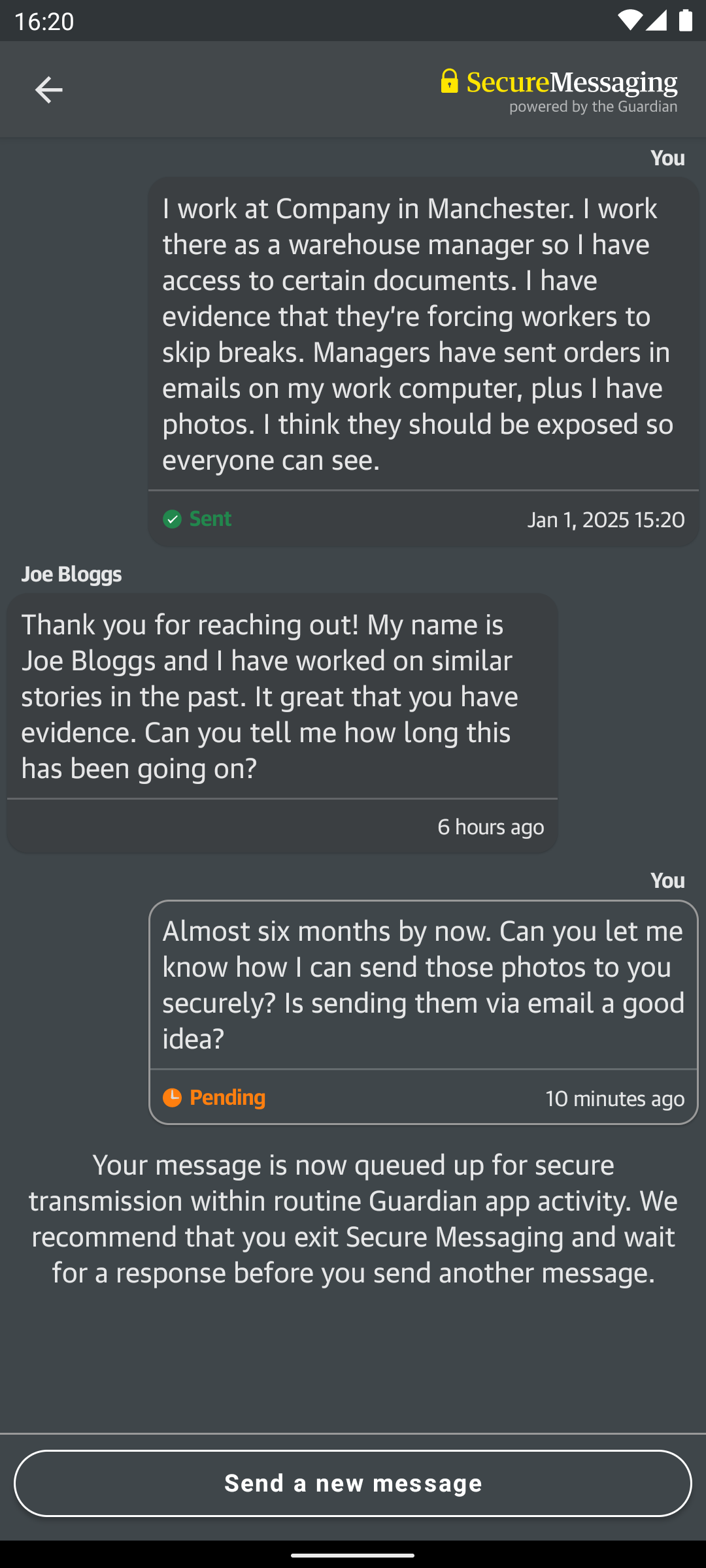
It’s this precise problem that The Guardian and developers at the University of Cambridge hoped to solve with the CoverDrop messaging system. It’s designed specifically for users of news apps to be able to make confidential submissions to journalists without leaving a telltale trail of evidence that could reveal their actions. It’s intended to be suitable for implementation by a wide range of news agencies if so desired, as laid out in the project white paper.
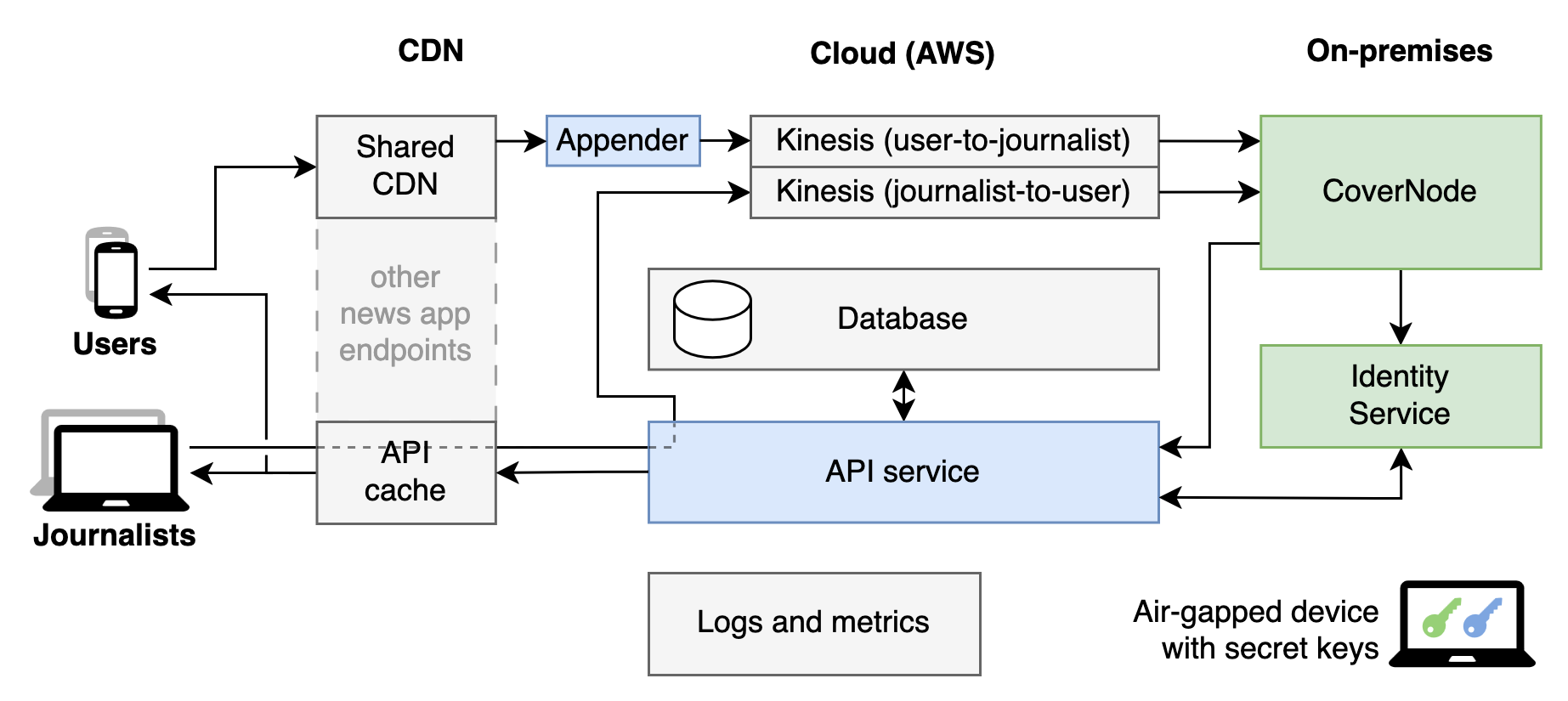
The CoverDrop system uses multiple techniques to not just encrypt messages, but hide whether or not any messaging is happening in the first place. The key is that CoverDrop is integrated into every copy of the Guardian’s news app out there, and each app sends small amounts of encrypted information to the system at regular intervals. Most of the time, this is just meaningless text with no information content whatsoever.
Messages sent via the app are encrypted, and are only retrievable with the use of the correct passphrase. Otherwise, the app will appear as if no messages were sent at all. Still, this doesn’t stop malicious interrogators from beating you if they think you’re holding out on coughing up a passphrase, regardless of if you have one or not. Credit: The Guardian via Github
That is, unless somebody has a message to send to a journalist. In that case, the message and the source’s public key is encrypted with the journalist’s public key, packaged up, and sent in such a way that it appears fundamentally no different to any other garbage message that is being sent to the CoverDrop servers. Both real and cover messages are encrypted the same way and have the same length, and are sent at the same times, so anyone monitoring network traffic won’t be able to tell the difference.
At the receiving end, CoverDrop’s secure servers remove an initial layer of encryption to filter out real messages from the cover messages. These are then provided to journalists via a dead drop delivery system, which pads the still-encrypted real messages with some cover messages to ensure the drops are always the same size. In the event a dead drop contains a message for a given journalist, they can decrypt it since it was encrypted with their public key in the first place. Since the messages also include the source’s public key, replies can be sent in the reverse fashion in a similarly secure way.
The system is designed for secure two-way communication between journalists and sources. This means if you want to chat securely with your friends, one of you has to get a job at The Guardian. Whether that’s a price worth paying is for you to decide. Credit: The Guardian via Github
As for on-device security, the system is designed to be as unrevealing as possible as to whether it has been used for secure messaging or not. Message storage vaults used by the app are encrypted, maintained at a regular size, and are routinely modified at regular periods whether covert messages are being sent or not. Unless the decryption passphrase is known, there is no obvious evidence that the app has been used to send any messages at all.
For those eager to implement the system, or merely audit its functionality, the CoverDrop codebase is available on Github. Providing a secure and deniable method of submitting sensitive tips is desirable to many newsrooms, which could lead to wider adoption or similar systems popping up elsewhere. Of course, no system is absolutely secure, but having a messaging system that focuses on more than just simple encryption will be a boon to those looking to communicate with less fear of surveillance or retribution.
 Log in